Key Takeaways
- Most mainstream AI chatbots – e.g. ChatGPT, Claude, Copilot, Gemini – are safe to use for everyday tasks
- The risk has shifted to AI agents and their skills and plugins. These small add-ons allow AI agents to download files, run code, and take potentially malicious actions without user oversight or consent
- ESET Research analyzed around 800,000 agentic skills between March and May 2026 and found over 25,000 suspicious cases, where a minor change could turn an agent malicious
- The three habits that protect most users: check the source, limit permissions, and use security software that watches over AI activity
- ESET Skills Checker lets you test a skill for free before installing it
Are AI agents actually safe? The short answer
Unlike traditional chatbots, AI agents don’t just generate or summarize content. They are designed to work autonomously to complete tasks on behalf of their user. Even if the agent is nominally safe, it might download malicious files and execute them, run unsafe scripts, or connect to potentially malicious sources. All of this could happen in the background without your knowledge or consent.
What AI agents are actually doing while you use them
Here’s how the AI landscape is changing.
From chatbots to AI agents
Chatbots are designed to understand complex queries in a user-guided, reactive manner. Agents act like de facto personal assistants, working independently and proactively to complete even more complex tasks. This might involve browsing the web, reading files and web pages, logging into your accounts, and in some cases even making payments – “reasoning” and “doing” as they go.
What's an "AI skill" or "AI plugin"?
AI skills are similar to browser plugins: small packages of instructions, data, code, but sometimes even tools that extend the functionality of your AI agent. But just as some browser plugins, even AI skills can be just at the edge of taking malicious actions, or be booby-trapped, hiding nasty surprises.
Where the risk sits in 2026
If you’re keen to try out AI agents, it’s important to understand the risks, as these aren’t as theoretical as one might think. Here are some examples:
Malicious AI skills and plugins
Since March 2026, ESET scanned over 800,000 AI skills and found over 25,000 that were considered suspicious and more than 2,500 that were classified as malicious. Some of the most obvious examples were designed to download infostealer malware into users’ devices with the goal of harvesting secrets such as API keys, passwords, or to steal payment information for crypto and banking applications. Others contained Trojans (hidden malware) and backdoors designed to silently provide attackers with access to victim’s systems.
Separate research1 from February found over 800 malicious skills listed on the ClawHub marketplace. These also contained infostealers, as well as crypto-stealing malware, and reverse shells that enable hackers to hijack their victims’ machines.
Fake AI assistant browser extensions
Hackers aren't just targeting AI skills, they’re also using AI as disguise in already known settings, such as browser extensions. Microsoft uncovered a major campaign in which harmful extensions impersonated legitimate AI assistants. They were designed to harvest user chat histories which may contain sensitive information like credentials. Microsoft spotted nearly one million downloads in this campaign alone.
Prompt injection, in plain English
One of the most serious threats to genAI and AI agents is prompt injection. It works in two ways. Direct prompt injection involves attackers inputting prompts into an LLM to trick it into ignoring its built-in safety guardrails. However, more relevant to AI agents is indirect prompt injection. Malicious instructions are hidden in web pages, posts, code or other content. When an agent interacts with that content, it’s manipulated into performing malicious activities.
AI-generated malware and ransomware
AI can also be used to generate malicious scripts or parts of malware and ransomware in real time. One of the first ransomware of this kind was PromptLock, discovered by ESET. However, this isn’t strictly speaking a threat to your AI agents.
How to tell if an AI agent or plugin is safe
Consider the following in order to minimize AI security risks:
- What permissions does it request? Be cautious of anything that seems to need more permissions than it should
- Has the author published other skills/plugins, with reviews? These may highlight any security issues
- Is the repository active, with recent updates and a responsive developer? If so, it’s a good sign they’re trying to keep on top of any new security/safety issues. However, be cautious that this isn’t 100% certain (for example an attacker may be responsive to build trust, and be able to switch skills from malicious into non-malicious mode)
- Does the plugin need to run unknown scripts or reach out to suspicious domains/resources during installation? This should be an immediate red flag
- Has the skill been scanned – e.g., with ESET AI Skills Checker – and what was the result?
- Is your cybersecurity software (or ESET AI Security features within the ESET HOME Security offering) set up to monitor AI activity?
- Monitor your agent/plugin after deploying in case it silently (and maliciously) changes its behavior
- Always keep your agent software updated so that it’s on the most secure version
How ESET protects you from unsafe AI agents
ESET has several features designed to protect you from AI agent-related threats. They include:
ESET AI Security – automatic protection on your device
- Monitors behavior and checks what your AI agent downloads and connects to (AI Behavioral Monitoring)
- Scans AI-related files and components, inspects URLs, and follows the full download chain to spot hidden multi-stage attacks (AI Agent Security)
- Adds an extra layer of protection when you interact with large language models such as ChatGPT. It checks URLs included in AI responses and warns you if they lead to phishing, malicious, or potentially unwanted content. It also scans scripts generated by the AI to help prevent you from running harmful code on your device (AI Conversation Security)
- Uses ESET LiveGuard to automatically block malicious activity with no user action required
ESET AI Skills Checker – a free tool you can try right now
- One-click scan of the full skill file, including every command, script, code block, and configuration
- Checks every URL the skill references against ESET threat databases and real-time analysis
- Simulates the AI skill in a sandbox to see how it behaves
- Is baked into ESET technology, to catch threats even if you haven’t run a new skill via Skill Checker
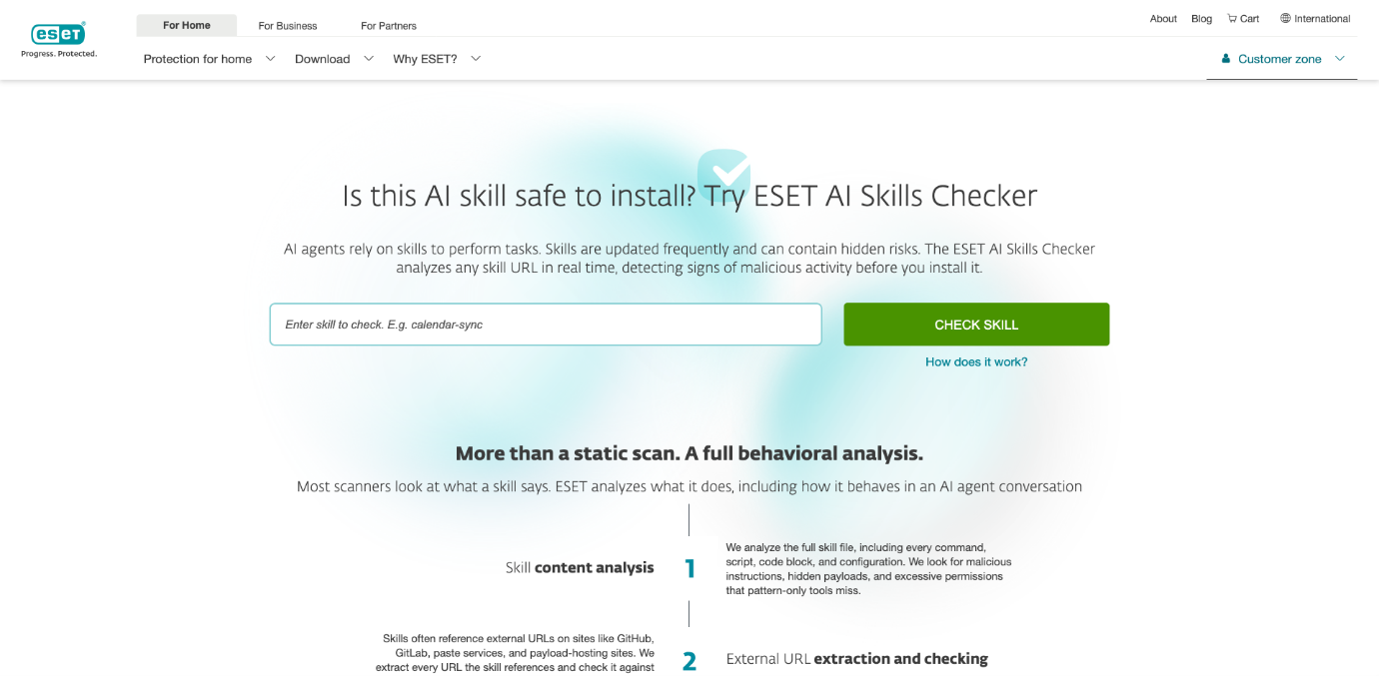
Note: The ESET AI Skills Checker is a testing and analysis tool designed specifically to check AI skills. For always-on, automated protection, choose ESET AI Security features included in eligible ESET Home Security.

ESET expert insights
„Instead of treating AI skills as complex prompts, we should treat them like software. Users should rely on robust security tools - such as ESET HOME Security - that can scan for and detect signs of potentially harmful behavior. Another area for review are the permissions each skill requests. If the skill asks for more access than it appears to need, that should be considered a red flag.
It is also important to verify who developed the skill and, where possible, choose options from known and verified developers. Users should look at community reviews, repository issues, and other public feedback for potential concerns. And, as with any other software, keeping the AI platform and agent software up to date is critical to reducing the risk of exploitation through known vulnerabilities.“
- Ondrej Kubovič, Security Awareness Specialist
Safe-use habits that work for everyone
Stay safe from malicious AI agents and/or skills by following these tips:
- Review permissions before installing a skill or plugin
- Keep your AI tools, browsers, and security software updated
- Use multi-factor authentication on your most important accounts
- Teach kids and less-technical family members the same three-question habit: Who made this? What does it want? Do I trust it?
- If your AI agent starts doing anything unusual, disallowed, or unplanned, shut it down
- Treat your agents like strangers – don’t share anything private or sensitive with them
Conclusion
In just a few years, AI has become an indispensable tool for many home users. That’s a fact not lost on cybercriminals, who have developed a range of mechanisms to turn the AI you use every day into a conduit for malware, data theft and more. The risks are arguably greatest today in the emerging field of AI agents. But although chatbots are more secure than they used to be, it would be unwise to let your guard down. Fortunately, best practices are emerging to keep you safe. Combine them with security features from trusted providers like ESET and you should be in a good place.
Frequently asked questions
Can AI agents steal your data?
Legitimate AI chatbot doesn't "steal" your data, although they might store and share what you type with others. That's different from malicious AI agents and tools – things like fake AI browser extensions, malicious agents or booby-trapped plugins which are designed to harvest chat histories, passwords, or session cookies. The first is a privacy setting to manage. The second is a security threat to detect and block.
Are AI plugins and AI Skills safe to install?
Some are but many are not. In early 2026 ESET Research scanned around 800,000 AI agent skills and found over 25,000 that were labelled suspicious, and more than 2,500 that were outright malicious. Before you install a skill, check the developer, read what permissions it requests and – if you want a free second opinion on a new skill – scan it with ESET AI Skills Checker.
Can an AI agent install malware on my computer?
Yes, if you or your AI agent install a malicious skill. In practice, sticking to reputable AI tools, being careful with plugin permissions, and running cybersecurity software that monitors AI activity (for example, ESET AI Security features included in ESET Home Security) help mitigate these threats.
What is indirect prompt injection, and should I worry about it?
Indirect prompt injection is when someone hides instructions in content an AI reads – e.g., a web page, a document, an email etc. Once this happens, the AI follows those instructions instead of yours. As a regular user, you don't need to become an expert in it. But it's a good reason to deploy security software to monitor your AI agents’ activity.
How do I know if an AI skill is trustworthy?
Check three things: who made it, what it's asking for access to, and whether other people have actually used it and said it works. Reasonable permissions, and a visible review history are good places to start. But when in doubt, you should run the skill through ESET AI Skills Checker before you install.
Additional references:
1) Koi AI. (n.d.). ClawHavoc 3.4.1 malicious ClawedBot skills found by the bot they were targeting. Koi AI Blog. https://www.koi.ai/blog/clawhavoc-341-malicious-clawedbot-skills-found-by-the-bot-they-were-targeting