Malware has many forms, and just as many ways (vectors) it could arrive from. Of these, malicious documents attached to emails might be the most common method. It’s simple: You receive an email from a sender (known or unknown) suggesting you open the attached document in it—to check the results of a tax audit, for example.
What happens next depends on what sort of file the document is: Is it a PDF? A docx with macros enabled? Or is it a ZIP file? In some cases, just opening a document could be enough to jump-start the compromise of a device…but let’s not put the cart before the horse and see what exactly these docs are, how attacks work (and why), and see what sort of security measures might be just enough to stop them in their tracks.
Key points of this article:
- Malicious email attachments like documents (maldocs) are weaponized files designed to deliver malware.
- Common maldoc formats include Office documents, PDFs, archives (ZIP/RAR), and HTML attachments.
- Email phishing remains one of the primary ways attackers distribute malicious documents to victims.
- Modern maldoc-based malware delivery relies on techniques such as scripts, exploits, and malicious macros.
- The most effective defense combines layered security controls—such as email filtering, sandboxing, and endpoint protection, with ongoing user awareness training.
What is a malicious email attachment?
A malicious email attachment is a file delivered via email that is designed to compromise a computer system or network. Among the most common examples are malicious documents (often referred to as maldocs), which contain embedded code or exploits that enable malicious activity.
By executing automatically, or by persuading users to trigger the payload themselves, these files can infect endpoints—including PCs, mobile devices, and servers—or act as an entry point for a wider network compromise.
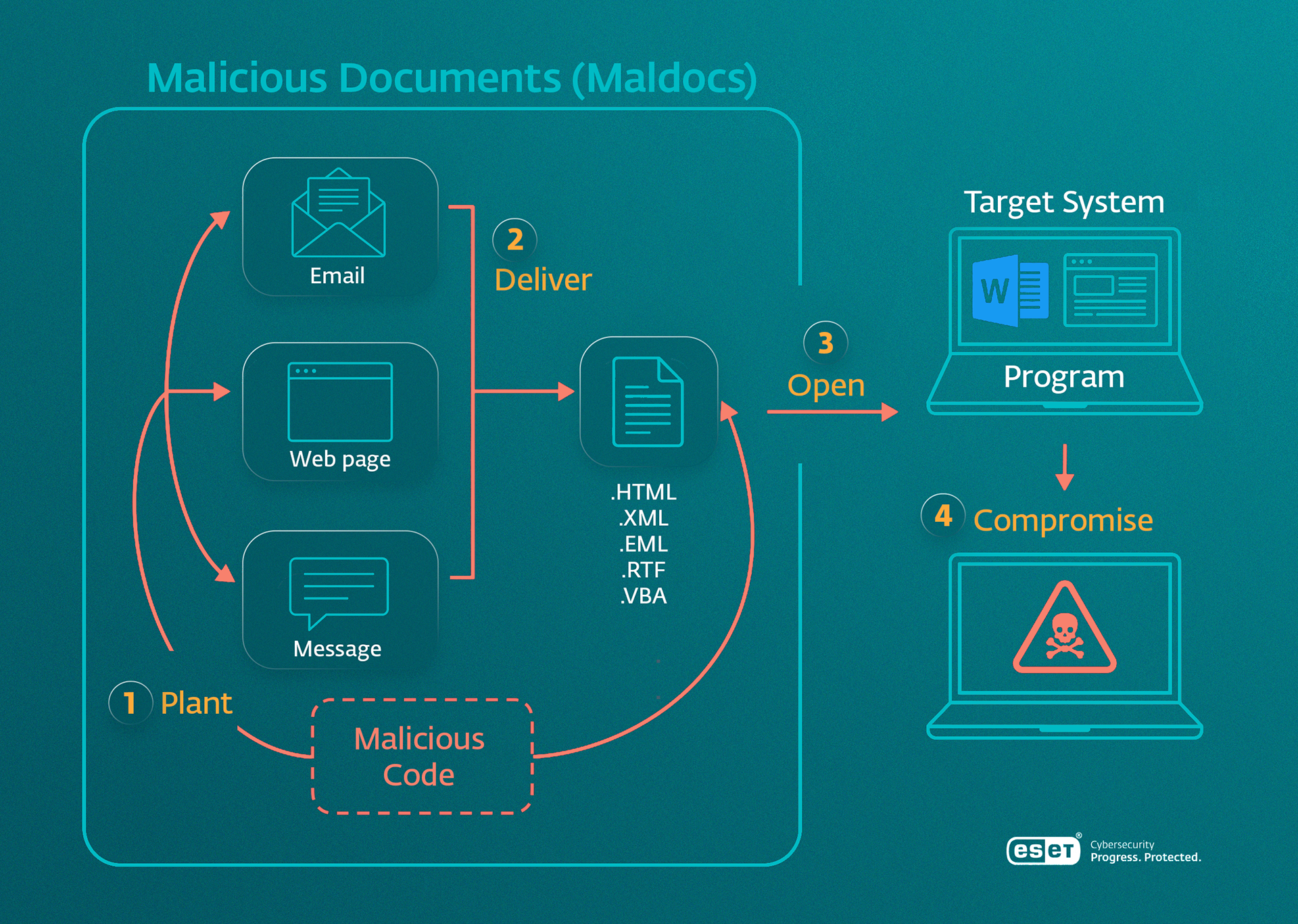
These documents often end up on systems via emails and other text-based interactions (like instant messaging) or online downloads. Put another way, it’s either phishing, or plain old uncareful file sharing practices, with the former being a leading cause of incidents (at 26%) based on ESET’s data. Now we can’t say how many of those phishing attacks included maldocs, but what we can say is that “bad” docs rank among the top three email-borne threats, specifically.
Related: What is phishing?
Types of maldocs
What are these “bad” docs, exactly? Well, they can have multiple formats:
- Office docs: Word, PowerPoint, Excel, and the like with macros enabled are popular formats due to widespread use by consumers and businesses alike. Attackers often leverage macros or embedded content to execute malicious code.
- PDFs: Much like the previous, the Portable Document Format is widely used to facilitate document sharing. Threat actors exploit their popularity by delivering malicious links, embedded scripts, or exploit code for a vulnerability within seemingly legitimate files.
- Archives: These are your ZIPs or RARs, which are compressed folders/files to ensure easier storage/portability/distribution due to a relatively lower file size and means to encrypt contents. Attackers take advantage of these containers to bundle and conceal malicious payloads, often adding password protection to evade security scanning.
- HTML attachments: This is an attachment that contains a webpage file that, when opened, behaves like a local webpage in a user’s browser rather than a static document. This enables attackers to create interactive phishing pages, redirect users to malicious sites, or deliver malicious scripts that could run when opened.
Regardless of format, these files rely on a combination of social engineering and technical tricks to achieve execution, so now it’s time to circle back to the prime suspect—phishing.
Related: What is social engineering?
Attack lifecycle, or how malicious emails turn worse
Phishing is a common attack vector for initial access, usually happening via some form of a message (email, instant message, etc.). Now, attackers don’t need malware for unauthorized access—that’s not exactly the point of sending a maldoc. The idea is that it increases the chances of a compromise by further hiding intent, and it also places another layer between a payload/execution and security monitoring.
So, while your spam filter could catch a malicious URL embedded directly in an email, it might not do the same if it were contained in a PDF. At the same time, users are generally more inclined to engage with content that appears legitimate, and well-crafted documents are one of the most effective ways to make malicious content appear trustworthy.
Related: Spearphishing as an advanced, tailored form of phishing.
Common tricks used by malicious email senders
Now, how does this work? Is it enough for an attacker like MuddyWater to send a simple message saying, “Please read the attached doc?” Obviously not. But the thing is that for this form of phishing to work, messages need to be spread widely, and fast, before security teams catch on to the latest campaign and adjust their detection engines.
Thus, there’s spam. Not regular spam, often a form of unsolicited advertising, but malicious spam, a kind of communication that is sent to as many recipients as possible, hoping to catch at least one or two email boxes unaware. And that’s often enough. As long as a single recipient opens the attachment and interacts with it, the attacker gains a foothold—turning a broad, low-effort campaign into a successful compromise.
This is how, during a wave of AceCryptor attacks, the Rescoms RAT was delivered via convincing spam emails, sometimes even coming from legitimate, but compromised, email accounts.
How do they do this? With a lure theme. Oftentimes, people fall victim to phishing due to a particularly relevant theme: HR updates, delivery notices, government calls—stuff that plays on an aspect of one’s regular life. Impersonation also falls in here, with the attacker pretending to be a long-lost relative, boss, lottery company, etc., to foster credibility, using urgency tactics to push a person to act fast, or else…
Thus, by embedding the next stage of the attack within an attachment, attackers make their request appear routine—after all, opening documents is a normal part of daily work. This blending of routine behavior with deception is what makes phishing campaigns so consistently effective, and potentially harder to detect.
Detection and prevention of malicious email attachments
So, now’s the time to see whether malicious docs are as crafty in hiding from security as their creators. The execution techniques employed in these vary, as the docs can include:
- Malicious macros: These automated series of commands make the lives of office workers easier by simplifying repetitive in-app actions. Not just for them though, as macros have often been used to do the same for malware, which lead to Microsoft blocking macros from the internet by default.
- Exploits, which take advantage of vulnerabilities in apps used to view or interact with these documents to execute malicious code, for example.
- Scripts: Small sets of commands that automatically run actions on a computer. Attackers often use them to download and run malware.
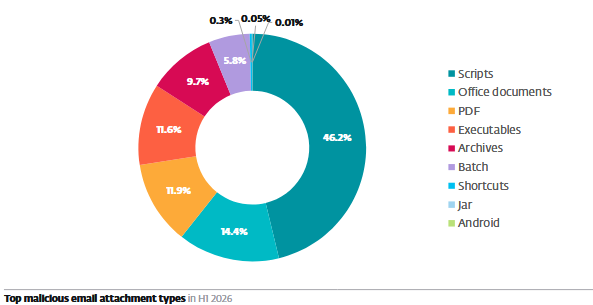
Of these three techniques, macros have historically been the most prevalent in malicious documents. However, as Microsoft has strengthened macro protections, attackers have increasingly shifted toward script-based techniques. In ESET’s telemetry1, scripts are actually the most prevalent email attachment type.
A good example of script use is the “Love you” malspam campaign.
Exploit-based documents remain less common due to the complexity and cost of developing or acquiring working exploits—the most potent ones rely on previously unknown (zero-day) vulnerabilities, which can be hard to discover and are often reserved for high-value targets.
Malicious document campaign detection: “enable content” and other tricks
While malicious documents are designed to evade detection and persuade users, defenders are not without options. Effective protection relies on identifying threats at multiple stages of the attack lifecycle.
Delivery: Email filtering
At the earliest stage, email and cloud collaboration platform security solutions like ESET Mail Security (EMSX) or ESET Cloud Office Security (ECOS) attempt to stop malicious attachments before they reach the user. These systems scan for known indicators, suspicious file types, malicious links (for anti-phishing), and spam patterns.
However, attackers often try to bypass these controls by embedding malicious content inside otherwise benign-looking files. For example, the ModiLoader campaign relied on attachments—such as ISO files or archives—beyond the reach of simple link-based detection.
Pre-execution analysis: Sandboxing and detonation
To overcome the limitations of static scanning, suspicious attachments can be detonated in a sandbox (like ESET LiveGuard Advanced, also available in EMSX and ECOS). This allows defenders (or security apps) to observe how a file behaves when opened, revealing hidden actions such as payload delivery or command execution—before it does anything malicious on an actual device.
This approach could prove particularly effective against threats like Emotet, which often used document attachments that appear harmless at first glance.
Execution: Behavior-based detection
If a malicious document makes it past initial filtering, special endpoint detection solutions—such as EDR or XDR—monitor behavior to detect suspicious activity in real time.
This includes signals such as:
- a document spawning unexpected processes
- scripts executing in the background
- connections to suspicious remote servers
In campaigns involving tools like the Rescoms RAT, delivered via email-borne cryptors such as AceCryptor, this stage is critical—because the actual threat often only becomes “visible” once the document has been opened and execution has begun. Likewise with an XDR, defenders can better pinpoint the actual root cause of a cyberattack.
The human layer: Awareness
Even the most advanced detection systems can be bypassed if a user is convinced to open a file and follow specific instructions. This is especially true in campaigns that use:
- compromised email accounts
- highly tailored phishing lures
- familiar business scenarios (invoices, HR updates)
By training users to question unexpected attachments via gamified security awareness trainings, organizations can disrupt the attack chain at its most critical point: the moment of interaction. This is especially important in the current AI age, which has thoroughly accelerated the potency of phishing attacks.
Malicious email attachment awareness checklist
Watch out for these red flags:
- Unexpected attachments, especially from unknown or unusual senders
- Files prompting you to “enable content,” “enable editing,” or bypass protections
- Password-protected archives with the password included in the message
- Document themes invoking urgency (invoices, deliveries, account issues)
- File types that are uncommon in day-to-day communication (e.g., .html, .iso)
At the very least, if an attachment is unexpected, always verify it via a secondary trusted channel before opening.
Conclusion
Malicious documents are a powerful tool. They make email-based phishing more believable and malware delivery stealthier. However, they can be exposed with the right mix of user awareness and layered security detection, turning a hidden threat into something visible, containable, and ultimately, preventable.
Oftentimes, spotting just one red flag is enough to stop a malicious email attack dead in its tracks.

FAQ: Malicious email attachments
What counts as a malicious email attachment?
A malicious email attachment is any file sent by email that is designed to harm a device, steal information, or help attackers gain access to a system. These attachments often look like ordinary documents, PDFs, archives, or webpage files, but may contain hidden code, links, scripts, or exploits.
What is a malicious document (maldoc)?
A malicious document is a file that contains hidden code or malicious content designed to compromise a device, steal data, or download malware. Common examples include Office documents, PDFs, archives, and HTML files.
How do malicious documents usually reach victims?
Most maldocs are delivered through phishing emails, messaging apps, or file-sharing platforms. Attackers often disguise them as invoices, HR documents, tax forms, or delivery notifications to appear legitimate.
What are the biggest warning signs of a malicious document?
Red flags include unexpected attachments, requests to “enable content” or “enable editing,” password-protected archives, urgent language, and unusual file types such as .html or .iso files.
How do security solutions detect malicious documents?
Organizations can detect maldocs through layered defenses such as email filtering, sandboxing, endpoint protection, EDR/XDR monitoring, and behavior-based detection that identifies suspicious activity after a file is opened.
What’s the best way to protect against malicious documents?
Combine security technology with user awareness. If an attachment is unexpected or suspicious, verify it through a trusted channel before opening it. Security awareness training and modern security software remain the most effective defenses.
Additional references:
1) ESET Research. (2026, July 8). ESET threat report H1 2026. (p. 29). ESET. https://web-assets.esetstatic.com/wls/en/papers/threat-reports/eset-threat-report-h12026.pdf.