
While Telegram is often seen as a more privacy-friendly alternative to Meta-owned messengers, its security model comes with serious limitations. For users facing higher-risks – including activists, journalists, and vulnerable communities – Telegram is widely considered one of the least suitable platforms for sensitive communication.
Despite that, according to Statista, Telegram is the third most popular global messenger app after WhatsApp and WeChat. It’s especially popular with journalists, activists, and online communities that rely on scalable, cross-platform communication, often unaware of its security shortcomings. At the same time, it has also been a popular platform for criminals and conspiracy channels who often use it as a simplified dark web alternative.
Beneath its sleek interface therefore lies a more complex debate: how secure is Telegram, really?
This article takes a close look at Telegram’s encryption, data practices, and how it compares to other messaging platforms. Whether you’re choosing your first messenger app or already using Telegram, we’ll break down what you need to know and how to protect your privacy while using it.
Is Telegram a Russian app?
Telegram was founded in 2013 by brothers Pavel and Nikolai Durov, best known for creating VKontakte, Russia’s largest social media platform. After clashing with Russian authorities over censorship demands, the Durovs left the country and relocated Telegram’s operations abroad. In 2024, Pavel Durov was arrested in France and later indicted on multiple charges related to Telegram’s alleged role in facilitating serious criminal activity, highlighting growing law-enforcement pressure on the platform and its leadership.
Although Telegram is officially headquartered in Dubai and denies any operational ties to Russia, several independent investigations paint a more complicated picture. An in-depth 2025 investigation by IStories found that key parts of Telegram’s network infrastructure — including IP address ranges and router-level access in certain data centers — were operated by companies whose owners have long-standing business relationships with Russian state institutions, including their Federal Security Service (FSB). While this does not prove direct control, it raises legitimate concerns that parts of Telegram’s technical backbone may be vulnerable to political pressure or exploitation by Russian authorities.
How Telegram’s encryption works
Before we dive into how Telegram’s encryption works, let’s first answer the question of why it matters. Every time you send a message online, it travels through a chain of servers, networks, and devices. Without encryption, anyone along the way, from hackers to internet providers and governments, could intercept and read your messages. Encryption turns your message into unreadable code that only the intended recipient can unlock, keeping your conversations private. But not all encryption is created equal.
Some apps encrypt messages in a way that only the sender and receiver can read them. This is called end-to-end encryption. Others encrypt messages during transmission but still store readable versions on their servers. Telegram uses both approaches, depending on the type of chat.
Client–server encryption: Trade-offs behind Telegram’s default chats
Telegram’s default messaging, including one-on-one chats, group messages, and public channels, uses a method called client–server encryption. This means your messages are encrypted on your device before being sent to Telegram’s servers. Once there, they’re decrypted so the message can be delivered to recipients, then stored on Telegram’s cloud.
This setup is built on Telegram’s proprietary MTProto 2.0 protocol, which uses AES-256 encryption, SHA-256 hashing, and a custom key generation scheme. While the technical details may sound complex, the important point is this: Telegram’s servers can access the contents of your cloud chats if needed.
This is not just a theoretical concern. Security researchers warn that this hybrid model creates a dangerous illusion of safety. Many Telegram users never enable secret chats, yet they still assume their conversations are secure. In reality, default Telegram chats should be treated as vulnerable to state-level pressure, legal demands, or infrastructure compromise – especially in countries like Russia where surveillance laws are extremely broad.
What is MTProto?
MTProto is Telegram’s custom encryption protocol. It powers both cloud chats (client–server encryption) and secret chats (end-to-end encryption). The current version, MTProto 2.0, uses strong cryptographic tools like AES‑256 and SHA‑256.
While technically robust, MTProto has faced criticism because it’s not open for full independent audits, unlike protocols used by apps like Signal.
The upside is convenience. Client–server encryption allows you to access your messages from multiple devices, back up photos, files, and chat history automatically, or restore conversations if you lose your phone. The trade-off is your privacy. Since Telegram holds the keys to decrypt your cloud chats, they could potentially access or share your messages with law enforcement if legally compelled or targeted by hackers seeking access to stored user data.
How easy it is to eavesdrop on such conversations?
Telegram claims that all cloud-stored messages are heavily encrypted, and that the decryption keys are split across different jurisdictions to make unauthorized access harder. But because the encryption is not end-to-end, you trust Telegram not just with your messages – but also with your metadata and stored content.
End-to-end encryption? Only in secret chats
For users seeking stronger confidentiality, Telegram offers secret chats – a feature designed for private, device-specific conversations. These chats are protected by end-to-end encryption, meaning only the sender and recipient hold the decryption keys. The messages cannot be read by Telegram, intercepted in transit, or restored from the cloud.
These chats are not stored on Telegram’s servers and are tied to the device they were started on. This means they can’t be accessed from other devices. Even media files sent in secret chats are encrypted with a separate key before upload, and Telegram claims it sees only random data which it purges regularly.
Secret chats use the Diffie–Hellman key exchange to establish a shared secret between devices. Telegram’s MTProto 2.0 protocol then applies SHA-256 hashing and variable padding to derive the message key. This key is used to generate a 256-bit AES encryption key and initialization vector for both encrypting and decrypting the messages.
Plus, the secret chats come with additional optional privacy features. Users can enable a self-destruct timer which causes messages to disappear after a set time once they’ve been read. Telegram also attempts to detect screenshots, and when possible, notifies users if the recipient tries to capture the conversation.
Despite all that, Telegram should be by no means considered safe for high-risk users. Real-world cases and investigative reporting show that Russian activists and opposition figures have had their Telegram activity examined during interrogations and used against them in criminal cases. Whether this resulted from device compromise, legal pressure, or exploitation of Telegram’s architecture, the message is the same: if your freedom or physical safety depends on privacy, Telegram – even in secret chat mode – is a risky choice.
Groups and channels
Telegram supports groups (up to 200,000 members) and channels (broadcasts to unlimited subscribers), both of which use client–server encryption, not end-to-end encryption. This means messages are encrypted during transmission and storage, but Telegram can access them if required.
However, admins can restrict posting, set auto-delete timers, and choose whether forwarded messages reveal the original source or appear anonymously.
Data collection and privacy practices
Telegram’s privacy policy outlines what user data it collects – and under what conditions. While the app markets itself as privacy-friendly, it does gather certain information, especially in its default cloud chat mode.
- Message and media storage: Messages, photos, videos, and documents from cloud chats are stored on Telegram’s servers to support multi-device access. Telegram claims this data is encrypted both in transit and at rest, with decryption keys split across jurisdictions to prevent unauthorized access by staff or attackers.
- Secret chats not stored: Messages sent via secret chats are never stored on Telegram’s servers. They remain only on the devices involved and are encrypted with keys known only to the participants. Media in secret chats is encrypted separately, and metadata is obfuscated so that Telegram retains only randomized data.
- Phone numbers and contacts: Telegram requires a phone number for account creation. If users enable contact syncing, the app uploads names and numbers from their address book to notify when contacts join Telegram. This syncing can be turned off, and stored contact data can be deleted via settings.
- IP addresses and metadata: Telegram may log IP addresses, device info, and login metadata to help detect spam and suspicious activity. According to its policy, IP data is stored for no longer than 12 months. The app does not track your location unless you explicitly choose to share it.
- Data storage locations: For users in the U.K. or European Economic Area, Telegram states that personal data is stored on servers in the Netherlands.
Security features and user controls
Two-step verification and passcodes
Telegram supports two-factor authentication (2FA) to protect accounts beyond the basic SMS login. When enabled, users must enter both an SMS code and a custom password. A recovery email can also be added – Telegram recommends securing it with 2FA as well.
For local protection, users can set a passcode lock on the app to prevent access by anyone holding the device. Both options are available under Settings › Privacy and Security.
Self-destruct timers and screenshot alerts
In secret chats, messages can be set to self-destruct after being read, disappearing from both devices. Telegram also attempts to detect and notify users of screenshots, though this isn’t foolproof – attackers can still use another device to capture the screen.
Session management and auto-destruct
Telegram lets users monitor and terminate active sessions across devices, showing device type and IP. There’s also an optional account self-destruct feature, which automatically deletes the account and all data after a period of inactivity.
Encryption key verification
When starting a secret chat, Telegram displays an encryption key image. Comparing this with your contact’s version helps verify that the encryption hasn’t been tampered with – ideally done in person or via a trusted channel.
Rooted or jailbroken devices
Telegram warns that rooted or jailbroken phones are vulnerable, as attackers may bypass system protections and access message data. To stay secure, users should avoid unofficial Telegram clones and keep their device’s operating system up to date.
Criticisms and security incidents
What is Telegram most often criticized for?
- Relying on its own encryption protocol rather than adopting widely accepted standards
- Not enabling end-to-end encryption as default
- Server-side code is not open source and therefore cannot be audited by independent reviewers
Think you’ve found a flaw in Telegram’s security?
Telegram runs a bug bounty program that rewards security researchers for reporting vulnerabilities in its code, services, or encryption protocol. Bounties range from $100 to over $100,000, depending on the severity and impact of the issue.
The program has been active since 2014 and continues to accept reports via security@telegram.org, as long as they follow Telegram’s scope and rules.
While Telegram promotes itself as a secure messaging platform, several incidents over the years have raised concerns about how certain design choices, bugs, or feature misconfigurations have exposed user data – sometimes at scale.
In 2018, researchers found that Telegram’s desktop app leaked IP addresses during peer-to-peer voice calls, and another flaw allowed attackers to smuggle malicious code via right-to-left text formatting, which was exploited to install cryptocurrency mining malware.
More recently, Telegram’s open architecture has been used to spread or expose personal data in massive quantities:
- In late 2023 and early 2024, researchers uncovered a 122 GB archive of leaked login credentials - including emails and passwords - being shared across hundreds of Telegram channels. Security researcher Troy Hunt later confirmed that the dataset contained 361 million unique email addresses, with over 151 million previously unseen in known breaches.
- In 2024, hackers used Telegram chatbots to leak sensitive medical and personal data from over 31 million customers of India’s Star Health insurer. Reuters verified the breach by downloading real documents; Telegram removed the bots after being notified, but new ones quickly appeared.
- Also in 2024, infostealer malware was caught using the Telegram Bot API to exfiltrate stolen data (“logs”), including credentials and system info.
Even well-intentioned features like People Nearby have drawn criticism: researchers demonstrated that it could reveal a user’s precise location – within tens of meters – far more accurately than advertised, posing serious privacy risks.
These examples show that while Telegram offers end-to-end encryption in secret chats, technical vulnerabilities, weak defaults, and underregulated platform features can create serious security gaps – even without direct misuse by the end user.
How Telegram compares to other messaging apps
Telegram takes a less secure approach to privacy and encryption than many of its competitors. Unlike Signal, WhatsApp, and iMessage, which all offer end-to-end encryption by default, Telegram’s standard cloud chats use client–server encryption. This allows for multi-device syncing and cloud backups, but it also means messages are stored, and potentially accessible, on Telegram’s servers. Only secret chats are end-to-end encrypted, and they must be manually enabled.
Signal is widely regarded as the gold standard for secure messaging. It uses a well-audited, open-source encryption protocol and applies end-to-end encryption by default. It is designed to minimize metadata collection and offers full transparency through its open server and client code.
WhatsApp also uses the Signal Protocol for message content, but it’s owned by Meta, which is known for collecting extensive metadata. Backups in WhatsApp – if stored in Google Drive or iCloud – may not be protected with end-to-end encryption, leaving them exposed to third parties.
iMessage, part of Apple’s tightly controlled ecosystem, applies end-to-end encryption for messages, but does not protect metadata and stores backups in iCloud by default, which again can expose message content unless the user has disabled cloud syncing.
Telegram, by comparison, offers unique features like support for groups of up to 200,000 members, broadcast channels, and cross-platform syncing. But it trades off some privacy in return for these features, particularly by storing cloud chats on its own servers and keeping its server-side code closed-source, which prevents independent security audits.
Feature Telegram (cloud chats) Telegram (secret chats) Signal WhatsApp iMessage Default encryption Client–server (MTProto) End‑to‑end (MTProto 2.0) End‑to‑end (Signal Protocol) End‑to‑end (Signal Protocol) End‑to‑end Server code open? No (closed source) N/A Yes No No Cloud backup Yes, enabled by default No No (opt‑in and optional; stored in iCloud for iOS) Yes (Google Drive / iCloud, but decryptable by service) Yes (iCloud backups) Contact discovery Via phone numbers; can disable Same as cloud Phone numbers only; no contact sync Requires phone number; collects metadata Uses Apple ID and phone; metadata collected by Apple Self‑destruct messages Yes (secret chats and media in cloud chats) Yes Yes (disappearing messages) Yes (disappearing messages) Yes (for iOS 17 and above) 2FA Optional Optional Optional (PIN) Yes (device lock) Yes (device lock) Group size Up to 200,000 N/A Up to 1,000 Up to 1,024 Up to 32 (Group FaceTime)
Use cases, misuse and censorship
Telegram’s flexibility and feature set attract a wide range of users. Activists and privacy advocates rely on secret chats and broadcast channels to organize securely without tying accounts to phone numbers. Meanwhile, businesses use Telegram’s groups, bots, and automation tools for customer support, community building, and marketing.
However, the same features that enable privacy and scalability can also be misused. Telegram users have been exploited by scammers posing as support agents, as well as extremist groups using public channels for propaganda. Its support for anonymous accounts and SIM-free registration (in some countries) complicates moderation and abuse prevention.
Telegram has also faced a government pushback. In 2018, Russia temporarily banned the app after it refused to hand over encryption keys to authorities. Now it seems the country wishes to ban both Telegram and WhatsApp again. Access is restricted in Iran and China, where users often rely on VPNs or proxy servers to bypass censorship.
That said, Telegram has occasionally complied with takedown requests involving terrorist content or disinformation.
How to stay safe on Telegram?
The first crucial safety tip is this – if you are an activist, journalist, whistle-blower, member of the LGBTI community in a hostile environment, or anyone whose communication could put you at serious risk, do not rely on Telegram for sensitive topics at all. Use a strongly audited, end-to-end encrypted messenger like Signal instead, and treat Telegram only as a tool for following public channels or handling low-risk, everyday chit-chat. To maximize your security should you still choose to use it, strongly consider these best practices:
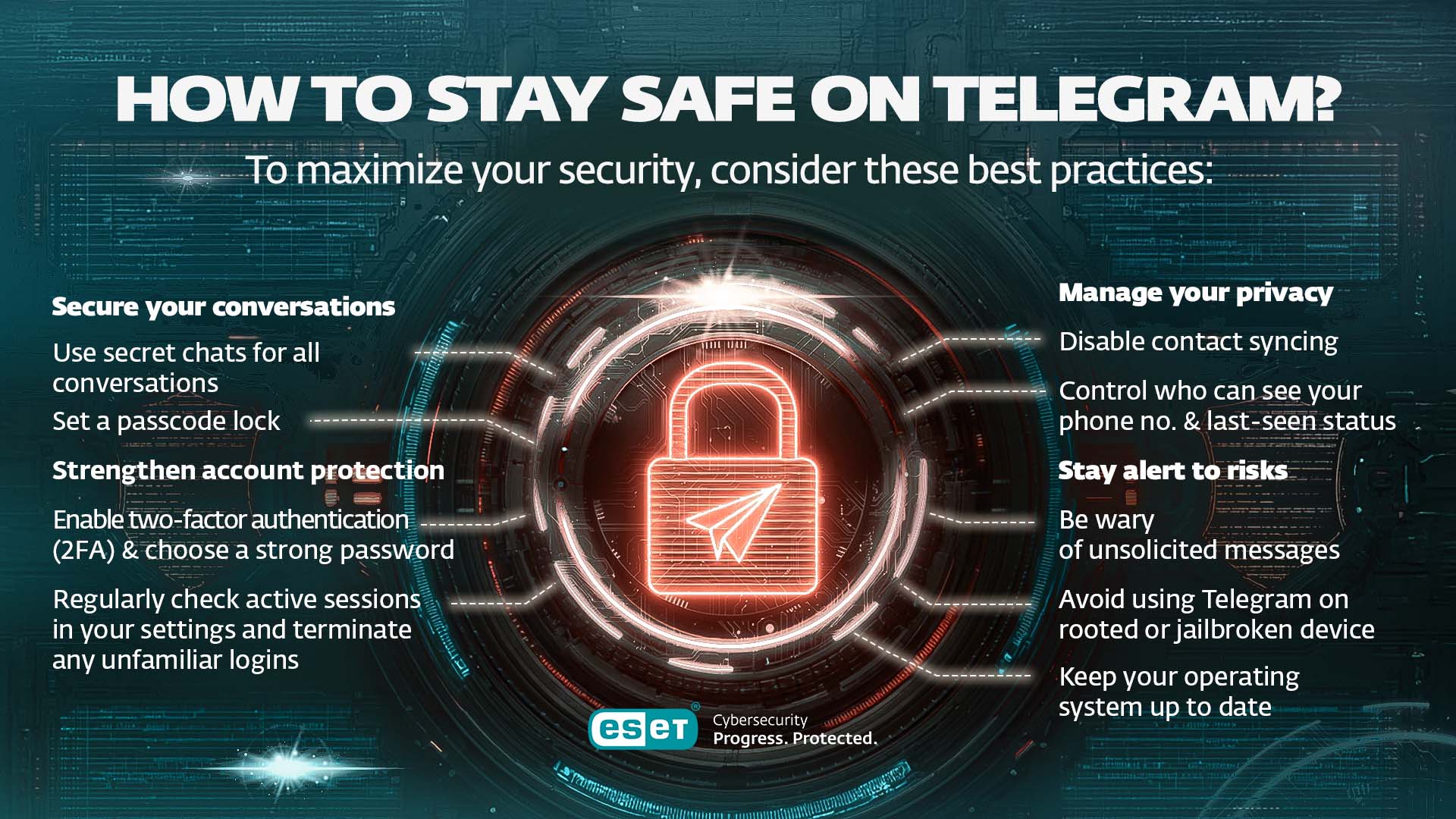
- Use secret chats for all conversations you still choose to have on Telegram. However, avoid sharing sensitive or private information altogether. High-risk topics belong on more secure platforms such as Signal.
- Set a passcode lock on the app to prevent access if someone gains physical control of your device.
Strengthen account protection
- Enable two-factor authentication (2FA) and choose a strong password. This helps defend against SIM-swap attacks and ensures that access requires more than just an SMS code.
- Regularly check active sessions in your settings and terminate any unfamiliar logins to keep your account secure.
Manage your privacy
- Disable contact syncing if you prefer not to share your address book. You can stop syncing and delete uploaded contacts from within the app settings.
- Control who can see your phone number and last-seen status through Telegram’s privacy options, allowing you to stay more anonymous.
Stay alert to risks
- Be wary of unsolicited messages. Scammers often impersonate support staff or promote fake giveaways. Always verify identities through trusted channels before sharing personal information.
- Avoid using Telegram on rooted or jailbroken devices, which are more vulnerable to malware and surveillance. Keep your operating system up to date and only download the app from official sources.
Would you like to add more advanced security measures?
Block forwarding and screenshots in group chats (if you're an admin).
Use anonymous posting in channels to avoid traceable usernames.
Set auto-delete timers on all chats – not just secret ones – via chat settings.
Review “Who can add me to groups?” to avoid being spammed or targeted.Disable message previews on your lock screen under Notifications.
Insights from an ESET expert
„While Telegram promotes itself as a secure and private messaging platform, many of these claims have been called into question over the years. Concerns include weak default security settings for chats, a lack of content moderation, and the platform's apparent reluctance to address dangerous activities, including criminal and cyberespionage operations. ESET research has documented numerous instances of Telegram being exploited for malicious purposes, ranging from bots enabling large-scale marketplace scams to the misuse of the official Telegram API for logging stolen information into group chats. Furthermore, the platform has been used as a command-and-control mechanism, a tool for spreading disinformation, a medium for propagating hacktivist campaigns, and even a marketplace for trading data stolen by affiliates of prominent infostealers. While Telegram can be a useful communication tool, users should exercise caution. For sharing sensitive information or ensuring robust privacy and security, other platforms with stronger default protections may offer better alternatives.“
- Ondrej Kubovič, Security Awareness Specialist
Conclusion: Is Telegram safe?
Telegram offers a robust set of features and a flexible user experience, but when it comes to privacy, it’s important to understand its limits. While secret chats provide end-to-end encryption and strong confidentiality, Telegram’s default cloud chats are not end-to-end encrypted and are stored on the company’s servers. This means they could, in theory, be accessed if Telegram is legally compelled or its infrastructure is compromised.
However, users wishing to remain on the platform can significantly improve their privacy by:
- Enabling two-step verification
- Not using Telegram for sensitive communication
- Configuring Telegram’s privacy settings carefully
For individuals with higher-risk profiles (e.g. activists, journalists, other) or those who prioritize transparency and open-source security, apps like Signal may offer stronger assurances.
Add more layers to your defense
To enhance your security while using Telegram, consider complementing its built-in protections with a trusted cybersecurity suite such as ESET Smart Security Premium. It protects your devices against spyware, phishing links, and other online threats – helping prevent account takeovers, especially when used alongside Telegram’s two-step verification.
For small businesses using Telegram for customer communication or internal coordination, ESET Small Business Security offers tailored endpoint and server protection against ransomware, spyware, and phishing – all with easy deployment. It’s designed to keep teams secure, even without dedicated IT support.
Finally, remember to install protection across all your devices – including computers, phones, and tablets – to ensure full coverage.
Frequently asked questions
Can Telegram be trusted?
Telegram offers some encryption via their secret chats feature, and includes a range of privacy features. However, its custom MTProto protocol has drawn criticism for lacking the peer review of widely adopted open standards. Additionally, cloud chats are not end-to-end encrypted, which means Telegram has technical access to users’ content. Whether Telegram is trustworthy depends on your risk profile: for everyday use and non-private information, its protections are generally sufficient. For highly sensitive conversations or if you are a high-risk individual, opt for another app such as e.g. Signal, which offers default end-to-end encryption and is fully open-source.
Why would someone want you to use Telegram?
Telegram is popular for its large group capacity, broadcast channels, cross-platform syncing, and bot integrations – all available for free and without ads. It also supports features like self-destructing messages and custom themes. For privacy-conscious users, secret chats provide end-to-end encryption and, in some regions, Telegram accounts can be created without linking a SIM card. Businesses, meanwhile, value Telegram’s API and automation tools for customer engagement.
Can Telegram chats be traced?
Yes – cloud chats can be traced more easily than secret chats. Messages are stored on Telegram’s servers and linked to your phone number, meaning authorities could request access. In contrast, secret chats are stored only on the devices involved and use end-to-end encryption, which Telegram claims makes them inaccessible to the company. However, metadata such as IP addresses may still be retained for up to 12 months, and poor device security or user error can still expose conversations.
How do I know if someone on Telegram is a scammer?
Watch out for unsolicited messages promising giveaways, investments, or urgent support. Scammers often impersonate official accounts, sometimes using usernames with minor misspellings to appear legitimate. Avoid sharing personal information or verification codes via chat. If in doubt, verify identities through other channels and report suspicious accounts using Telegram’s built-in reporting tools.